
Editing Sentences (Japanese Voice Libraries)
Quick Start Guide2025/10/2 9:232026/10/5 10:08Installing VoiSona Talk2025/11/3 7:492026/9/1 15:12Signing In2025/11/3 7:492026/9/1 15:19Creating, Opening, and Saving Projects2026/10/2 10:252026/10/2 10:26Selecting a Voice Library2025/11/3 7:492026/9/1 15:28Entering Sentences2025/11/3 7:492026/9/1 16:49Playing Back Sentences2026/9/1 15:022026/9/1 15:04Editing Sentences (Japanese Voice Libraries)2025/11/3 7:492026/10/2 5:05Editing Sentences (English Voice Libraries)2026/10/5 16:182026/10/2 5:17Adjusting Parameters2025/11/3 7:492026/10/1 6:47Importing and Exporting Files2025/11/3 7:482026/10/4 17:18Setting Preferences2025/11/3 7:482026/10/4 17:19REST API Tutorial2025/11/3 7:482026/10/4 12:46Frequently Asked Questions (FAQ)2025/11/3 7:472026/10/3 13:55
In the adjustment pane at the bottom of the window, you can edit the pronunciation, accent, and durations of a sentence in detail for more natural reading.
This page is for Japanese voice libraries.
For English voice libraries, see Editing Sentences (English Voice Libraries).
Editing PronunciationChanging the PronunciationDevoicing VowelsResetting PronunciationAdjusting DurationsEditing WordsSplitting a WordJoining WordsRegistering Words (User Dictionary)Editing AccentsAdjusting AccentSplitting and Joining Accent PhrasesAdding and Deleting Pauses
Editing Pronunciation
This section explains the operations for editing pronunciation.
Changing the Pronunciation
You can directly change the pronunciation of the entered text.
- Click the pronunciation editing area.
- Edit the pronunciation in katakana or hiragana.
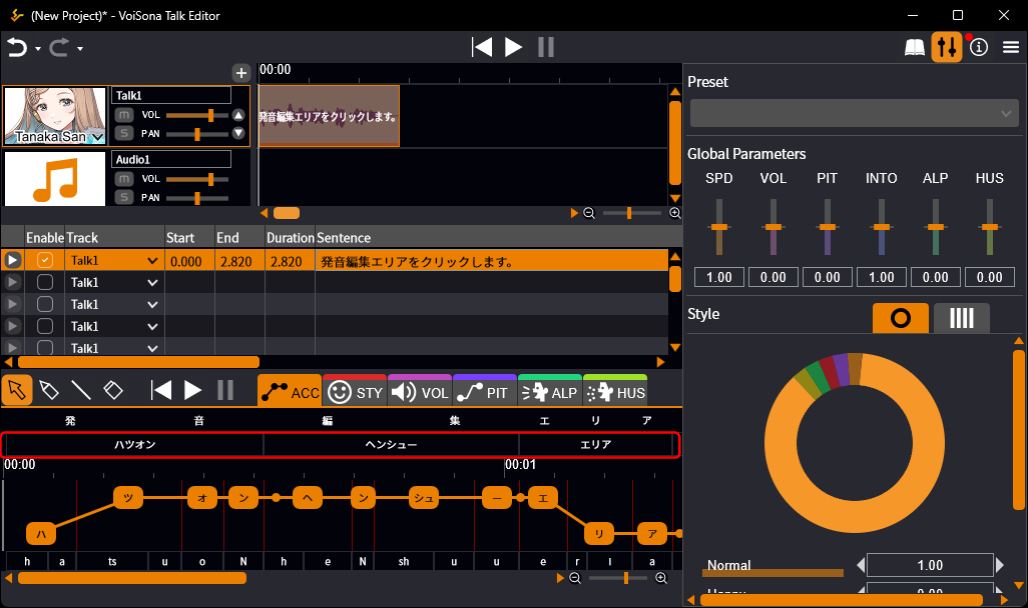
Characters whose pronunciation used for synthesis differs from the generated pronunciation are shown in a different color.
If a sentence for a Japanese voice library contains English letters, they are read letter by letter, such as "エー・ビー・シー".
How input and editing affect the pronunciation
In VoiSona Talk, when part of a sentence is changed, the pronunciation and accent of the unchanged parts are kept as far as possible.
Therefore, the same sentence can end up with a different pronunciation depending on how it was entered or edited.
Example:
- Enter "昨日は雨" as the sentence
- The sentence is "昨日は雨" and the pronunciation is "キノーワアメ"
- ① Enter "昨日は晴" as the sentence and change the pronunciation "キノー" to "サクジツ" ② Change "晴" to "雨"
- The sentence is "昨日は雨" and the pronunciation is "サクジツワアメ" (Even though part of the sentence was changed in ②, the pronunciation of part ①, which was not changed at that time, is not reset.)
Devoicing Vowels
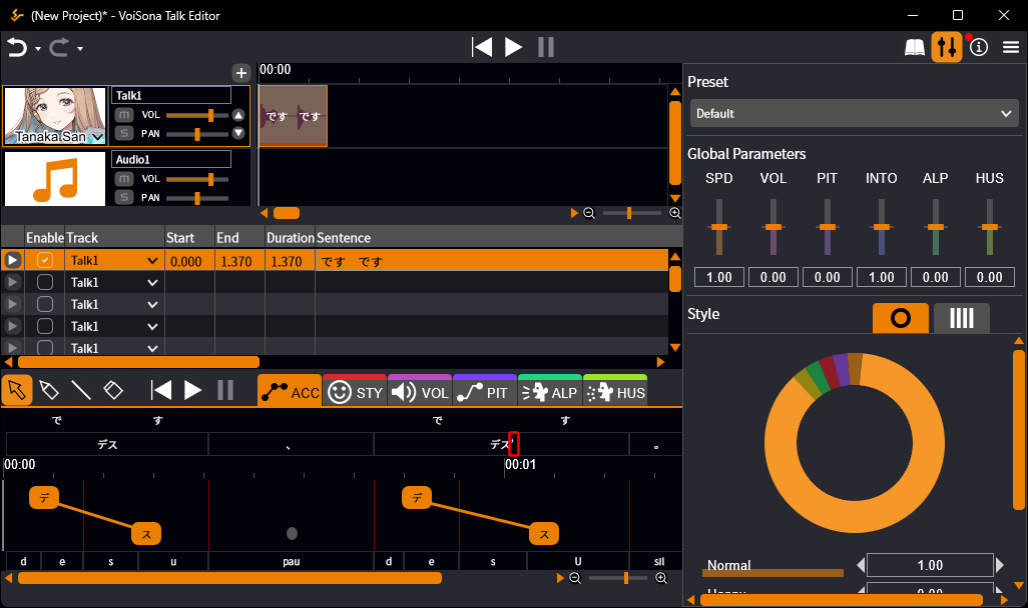
Add a full-width apostrophe (’) at the end of the pronunciation to devoice the vowel.
Example:
- Set the pronunciation to "デス"
- The phonemes are "d, e, s, u"
- Set the pronunciation to "デス’"
- The phonemes are "d, e, s, U" (/u/ becomes the devoiced phoneme /U/)
Resetting Pronunciation
Resetting the pronunciation returns it to the generated pronunciation.
You can reset a whole sentence or a single word.
- Do one of the following.
- To reset the whole sentence Right-click the sentence in the sentence list and select "Reset Pronunciation", or right-click the pronunciation editing area and select "Reset Sentence Pronunciation".
- To reset one word Right-click the word in the pronunciation editing area and select "Reset Word Pronunciation".
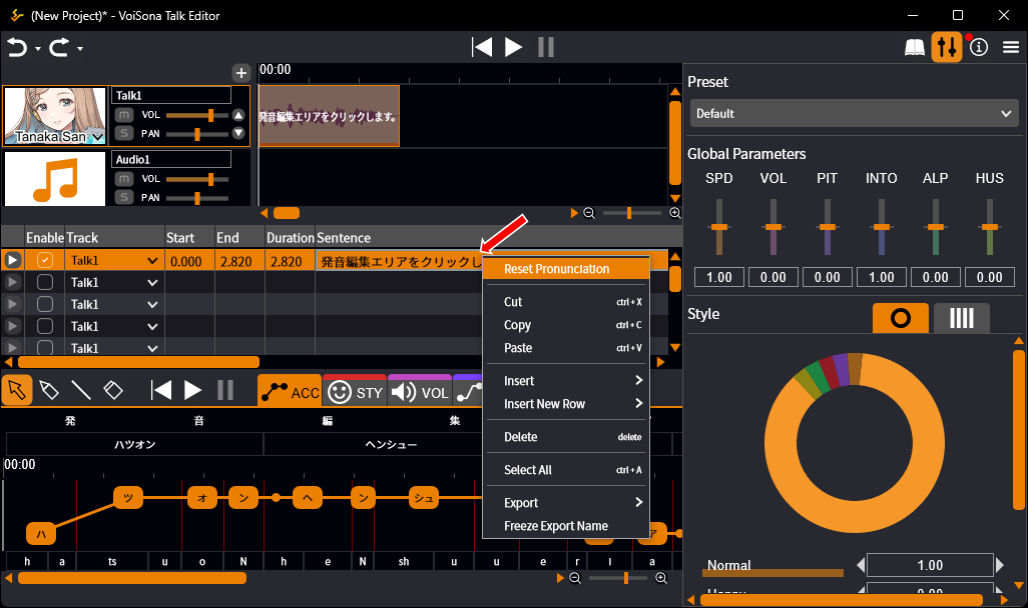
If the sentence contains words registered in the User Dictionary, their pronunciation is applied when you reset.
Adjusting Durations
In the adjustment pane, you can finely adjust the duration of each phoneme and mora.
- Do one of the following.
- To adjust by phoneme Drag a phoneme boundary bar (shown in gray at the bottom of the adjustment pane)
- To adjust by mora Drag a mora boundary bar (shown in red) in the ACC tab
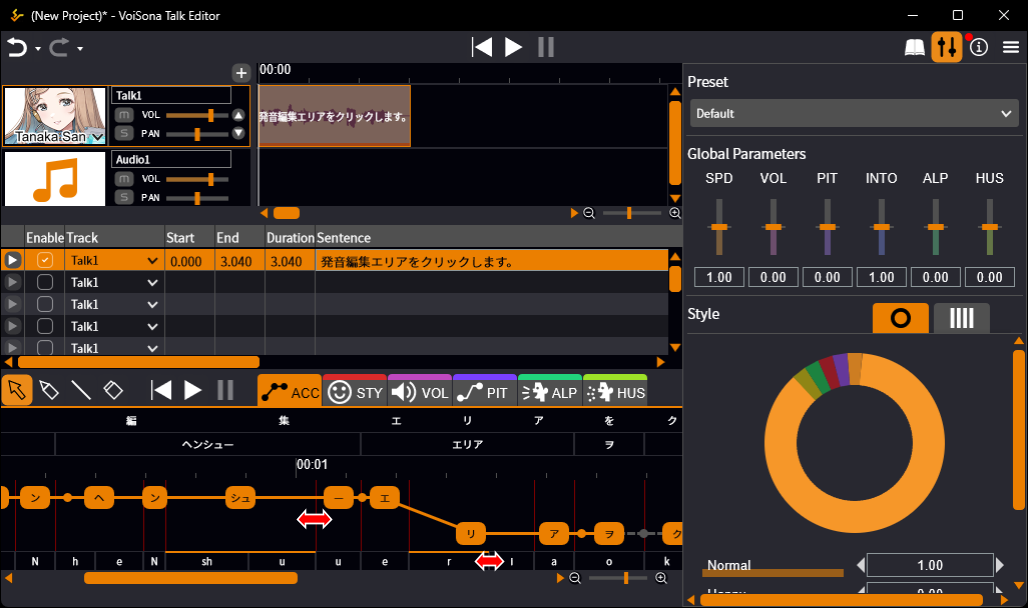
Hold down Ctrl while dragging to change only the two phonemes (or moras) on either side of the bar. Everything after them stays where it is.
To return a duration to the generated duration, do one of the following.
- Double-click a boundary bar.
- Right-click a boundary bar and select "Reset Phoneme Duration" or "Reset Mora Duration".
- Select the Eraser Tool and drag across the boundary bars.
Editing Words
Correcting word boundaries produces more natural synthesized speech.
You can also register words that need a special pronunciation in the User Dictionary.
Splitting a Word
Splitting a word lets you adjust the accent more finely.
- Move the mouse cursor between characters within a word. The mouse cursor changes to scissors.
- Click at that position. The word is split.
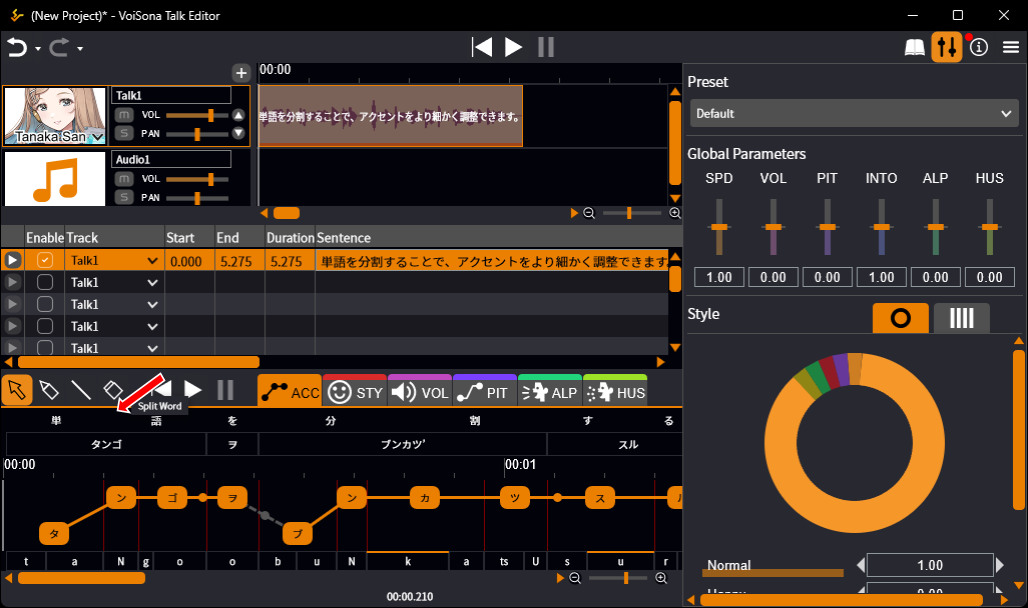
Joining Words
Joining words treats the joined range as a single word.
- Move the mouse cursor to a word boundary in the pronunciation editing area and hold down Ctrl. The mouse cursor changes to a bind.
- Click at that position. The words are joined.
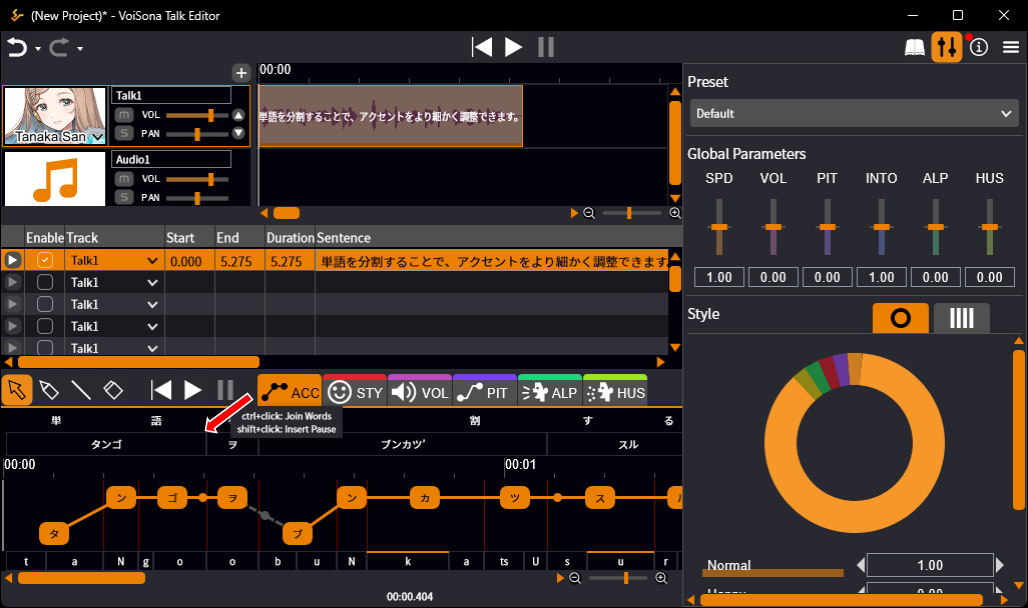
Shift-click a word boundary in the pronunciation editing area to insert a pause (、).
Registering Words (User Dictionary)
Register hard-to-read personal names, place names, and other words that are not normally read correctly in the User Dictionary to have them pronounced correctly.
- Click the "User Dictionary" button to open the panel.
- With <New> selected, set the following items.
- Representation Enter the word to register in full-width characters (any combination of kanji, alphabet, katakana, and hiragana).
- Pronunciation Enter the pronunciation of the word in full-width katakana.
- Accent After you enter the pronunciation and press Enter, its moras appear here. Click the mora to make it the accent nucleus (the mora right before the pitch falls).
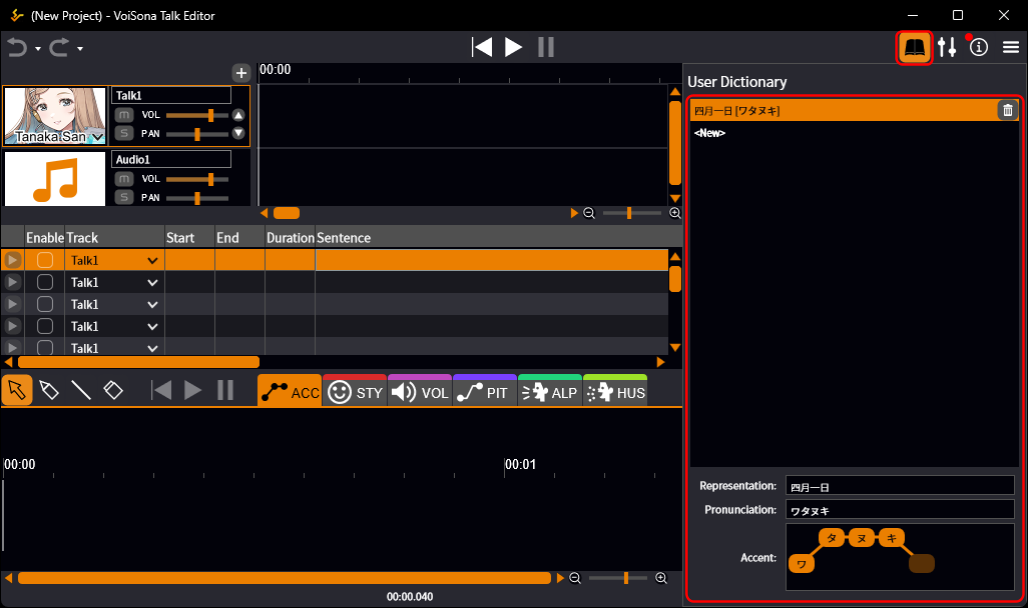
Changes to the User Dictionary are saved as you make them.
They are not applied automatically to sentences that have already been entered, so reset the pronunciation of those sentences to apply the dictionary.
If two or more entries have the same representation, the one higher in the list takes precedence.
Drag an entry in the list to change the order.
Editing Accents
You can adjust the accent position within a sentence.
You can also split accent phrases to adjust in finer units.
Accent phrase
A group of accent within a sentence.
A sentence is divided into several accent phrases, and the accent of each can be adjusted separately.
Example: "今日はいい天気ですね" → "今日は|いい|天気|ですね"
Mora
A unit corresponding to the rhythm of pronunciation, also called a "beat".
In Japanese, one kana is basically one mora, but the small "っ", the "ん", and the long vowel mark "ー" each count as one mora as well.
Contracted sounds such as "きゃ" (with a small "ゃ", "ゅ", or "ょ") are one mora as a whole.
Example: "今日は晴れ" → "キョ・ー・ワ・ハ・レ"
Accent nucleus
The mora in an accent phrase right before the pitch falls from high to low.
The Japanese accent is defined by the mora at which the pitch falls, and an accent phrase can also have no such fall.
Example: "はし" is pronounced as 箸 (chopsticks) when the accent nucleus is "ハ", as 橋 (bridge) when it is "シ", and as 端 (edge) when there is none.
Adjusting Accent
You can finely adjust the accent position of a sentence.
- Click the "ACC" tab of the adjustment pane.
- You can do the following on the displayed moras.
- Set as the accent nucleus Click the mora
- Toggle the pitch of the mora (high/low) Ctrl-click the mora
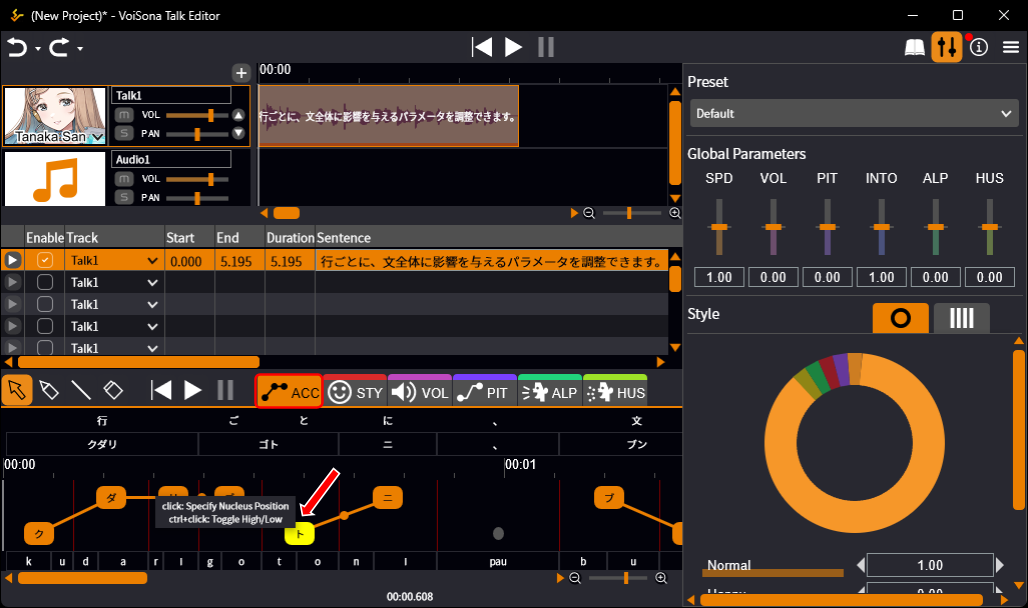
The generated accent stays visible as a reference shown in gray, so you can compare your edits with it.
To return an accent to the generated accent, do one of the following.
- Right-click a mora and select "Reset Mora Accent", "Reset Word Accent", "Reset Phrase Accent", or "Reset Sentence Accent".
- Select the Eraser Tool and drag across the moras.
Splitting and Joining Accent Phrases
Accent phrases can be split and joined.
- Point to the word boundary circle displayed at a word boundary and click.
- Joined boundary (orange circle) The words on both sides belong to the same accent phrase. The cursor changes to scissors, and clicking splits the accent phrase ("Split Accent Phrase").
- Split boundary (gray circle) The words on both sides belong to different accent phrases. The cursor changes to a bind, and clicking joins the accent phrases ("Join Accent Phrases").
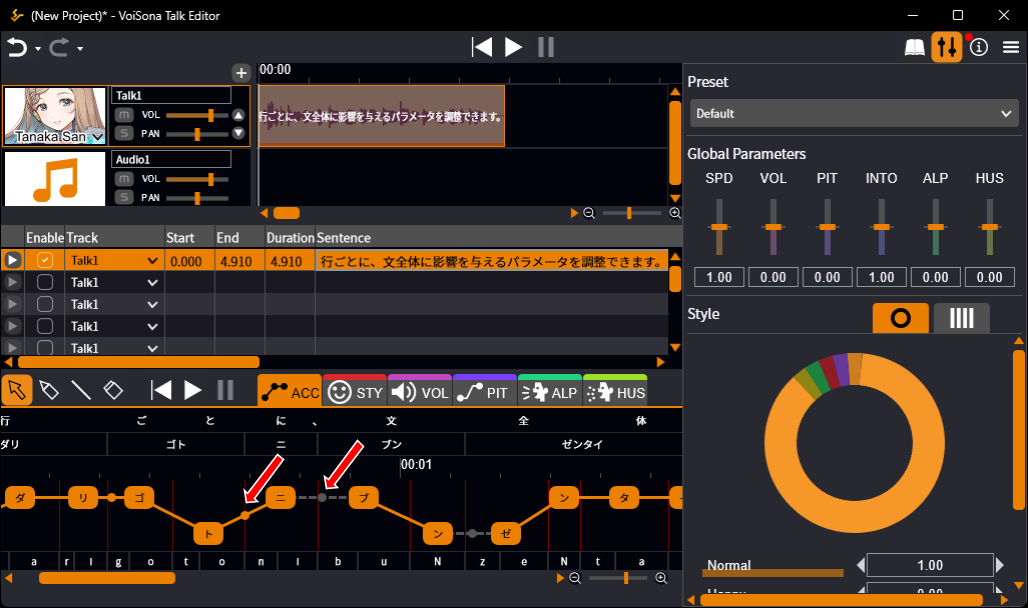
Accent phrases can only be split at word boundaries.
For how to create a word boundary, see Splitting a Word.
Adding and Deleting Pauses
You can add a pause at a word boundary or delete an existing pause.
- Right-click the circle at a word boundary or the circle on a pause (、).
- Select an operation from the menu.
- "Insert Pause" Adds a pause (、) at the word boundary.
- "Delete Pause" Deletes the pause (、).
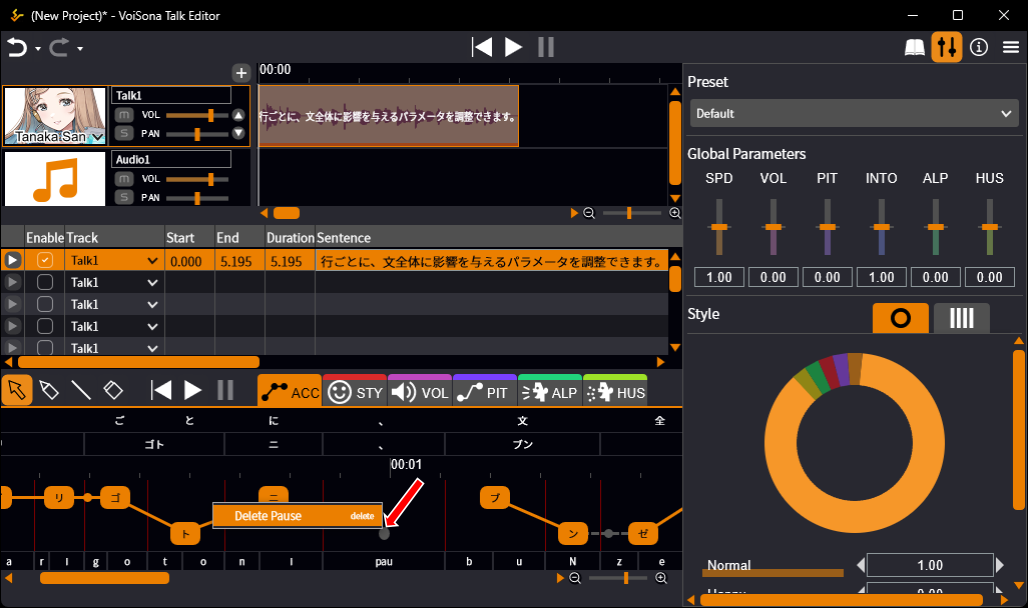
You can also insert a pause by Shift-clicking a word boundary in the pronunciation editing area.