Setting Preferences
Quick Start Guide2025/10/2 9:232026/10/5 10:08Installing VoiSona Talk2025/11/3 7:492026/9/1 15:12Signing In2025/11/3 7:492026/9/1 15:19Creating, Opening, and Saving Projects2026/10/2 10:252026/10/2 10:26Selecting a Voice Library2025/11/3 7:492026/9/1 15:28Entering Sentences2025/11/3 7:492026/9/1 16:49Playing Back Sentences2026/9/1 15:022026/9/1 15:04Editing Sentences (Japanese Voice Libraries)2025/11/3 7:492026/10/2 5:05Editing Sentences (English Voice Libraries)2026/10/5 16:182026/10/2 5:17Adjusting Parameters2025/11/3 7:492026/10/1 6:47Importing and Exporting Files2025/11/3 7:482026/10/4 17:18Setting Preferences2025/11/3 7:482026/10/4 17:19REST API Tutorial2025/11/3 7:482026/10/4 12:46Frequently Asked Questions (FAQ)2025/11/3 7:472026/10/3 13:55
You can change the display language, the overall behavior of the editor, the default values for new sentences and exports, the shortcut key assignments, and the REST API settings.
Opening Preferences
- Select "Edit" > "Preferences" from the menu bar.
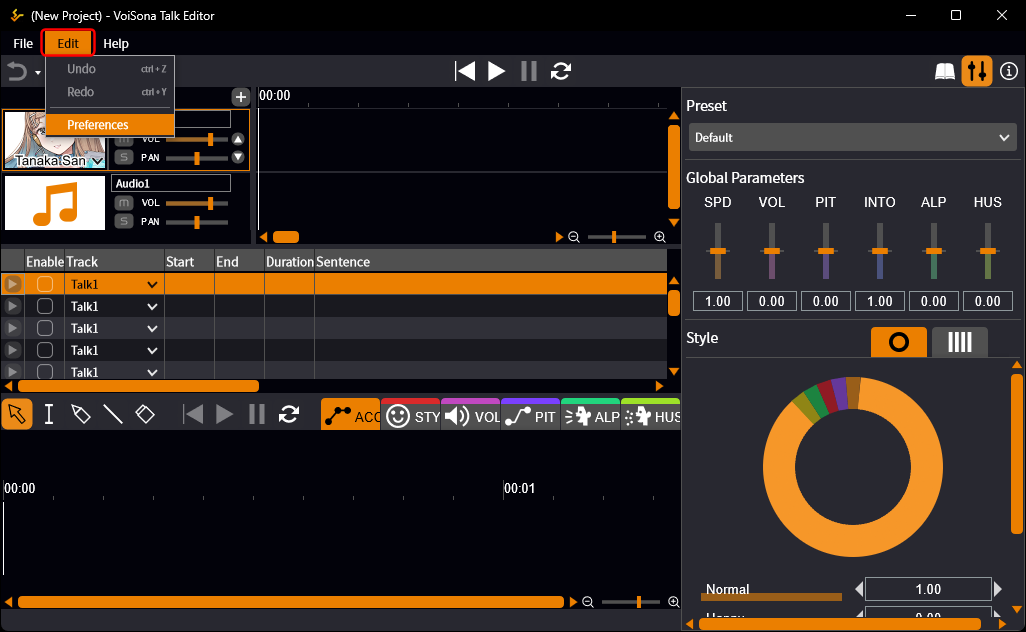
- Switch the tabs and change the settings. Each change takes effect as soon as you make it. Close the dialog when you are done.
The tabs are "General", "Defaults", "Shortcuts", "API", and "Audio".
General
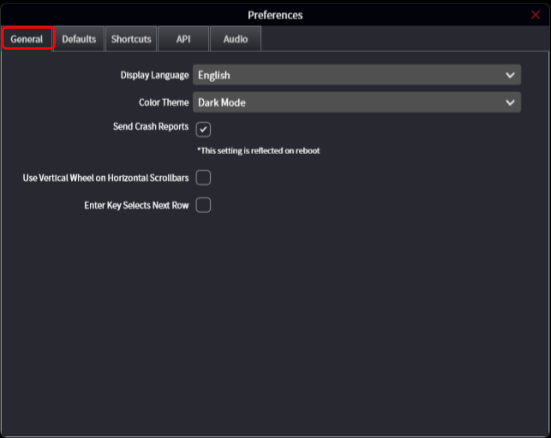
Settings for the display and for how the editor behaves.
- Display Language The language of the user interface. Choose 日本語, English, or "Use System Settings". "Use System Settings" follows the language of the OS and is the initial setting. The change is applied immediately.
- Color Theme "Dark Mode" (initial setting) or "Light Mode".
- Send Crash Reports Whether to send a report to the developer when the application crashes. On by default. The change is reflected the next time the application starts.
- Use Vertical Wheel on Horizontal Scrollbars When on, turning the mouse wheel over a horizontal scrollbar scrolls horizontally. Off by default.
- Enter Key Selects Next Row Changes what the Enter key does when you confirm a sentence in the sentence list. When off (initial setting), Enter confirms the sentence and Ctrl+Enter confirms it and selects the next line. When on, the two are swapped.
Defaults
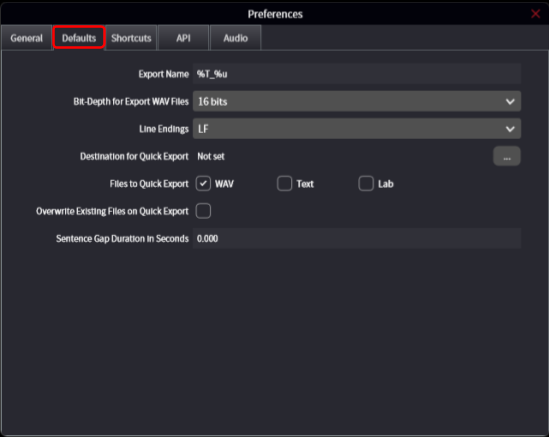
Default values used for new sentences and for exporting.
- Sentence Gap Duration in Seconds The gap placed between a sentence and the new sentence added after it on the track timeline. The initial value is 0.
- Export Name The initial value of the "Export Name" column of a new sentence. The initial value is "%T_%u". The symbols %d, %e, %s, %t, %T, and %u are replaced as described in Replacing Strings in Export Names.
- Bit-Depth for Export WAV Files The bit depth of exported WAV files: "16 bits" (initial setting), "24 bits", or "32 bits (float)". This setting and the fixed 48 kHz sampling rate apply only to the exported files; they have nothing to do with the audio device settings in the "Audio" tab.
- Line Endings The line endings of exported text files: "LF" (initial setting) or "CRLF".
- Destination for Quick Export, Files to Quick Export, Overwrite Existing Files on Quick Export The settings used by Quick Export. The destination is "Not set" until you choose a folder.
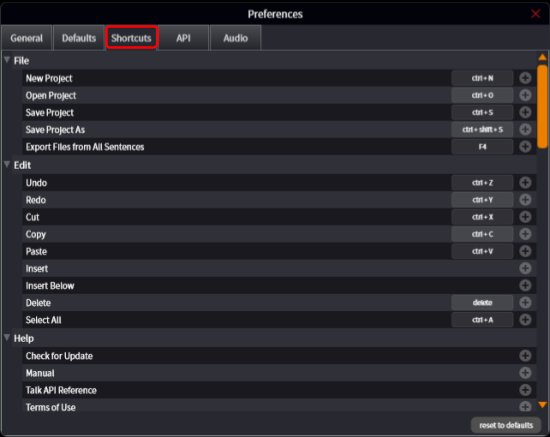
Shortcuts
The keys assigned to each operation.
The operations are grouped by category.
- Click the key shown next to an operation, or the empty space next to it, and press the new key combination.
- To remove an assignment, click the key and choose to remove it.
Click "reset to defaults" to return all assignments to the initial state.
Some operations have no key assigned initially, such as "Export WAV", "Export Text", and "Export Lab". Assign a key here to use them.
Shortcut keys greatly improve your work efficiency, so make good use of them.
API
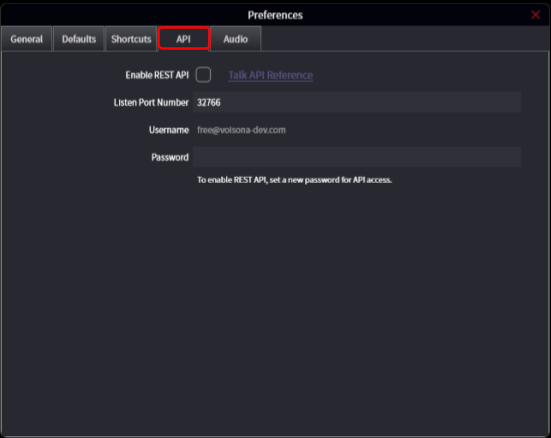
- Enable REST API Turns the REST API server on or off. While it is on, the port number and password cannot be changed. To change them, turn it off first.
- Listen Port Number The port number the server listens on. The initial value is 32766.
- Username The email address you signed in with. It cannot be changed.
- Password The password used to access the API. It must be set before the REST API can be enabled, and it does not have to be the same as your sign-in password.
- Talk API Reference Opens the API reference. The link becomes active while the REST API is enabled.
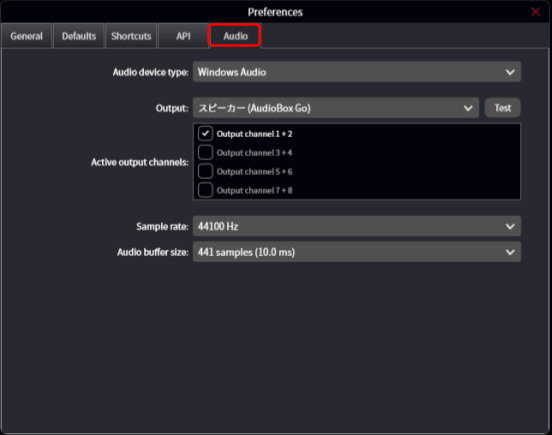
Audio
Settings for the audio output device used for playback: the device type, the output device, the sample rate, and the buffer size.
The sample rate here is the playback setting of the audio device.
It does not affect exported WAV files, which are always written at 48 kHz.